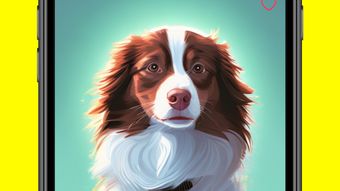

Download Yuzu AI Portrait – AI Portrait for Your Pet, Pet Photography, Creative Tool, iPhone Software
Overview
Yuzu: AI Portrait for Your Pet is a multimedia application designed for pet owners seeking a creative and personalized way to celebrate their furry companions. Available exclusively on the iPhone platform, the software leverages artificial intelligence to transform photographs of pets into stylized portraits. The primary purpose of the application is to enable users to generate visually striking, AI-enhanced images that reflect the unique personality and appearance of their animals. By allowing users to train a custom AI model using their pet’s photos, Yuzu offers a tailored experience that emphasizes individuality and creativity.
Target users include casual pet enthusiasts, social media content creators, and individuals interested in AI-driven visual art. The application is designed with accessibility in mind, ensuring that users of all technical skill levels can participate in the creative process. Real-world usage scenarios include generating portrait art for personal albums, creating unique digital gifts, or sharing imaginative pet scenarios on social platforms. The developer, Unusual Labs Inc., has positioned the app as a fun and engaging tool that blends pet photography with AI innovation.
Key Features & Capabilities
- AI-Powered Portrait Generation: Users can upload photos of their pets to train a custom AI model, which then generates high-quality, stylized portraits based on the learned features.
- Style Customization: A variety of artistic styles are available, allowing users to apply different visual treatments—such as oil painting, watercolor, or digital illustration—to their pet’s portrait.
- Imaginative Scenario Creation: The app enables users to place their AI-generated pet portraits in diverse, user-defined scenarios, such as historical settings, fantasy worlds, or futuristic environments.
- Guided Creative Prompts: To assist users in developing their ideas, Yuzu provides prompt suggestions that help shape the narrative and visual direction of each portrait.
- Personalized AI Model Training: The application learns from the user’s provided images, ensuring that the output reflects the pet’s unique facial features and physical traits.
These features work together to support a seamless creative workflow. For example, a user might upload five photos of their cat, select the "fantasy elf" style, and use a prompt like “cat as a woodland guardian” to generate a whimsical portrait. The AI then combines the pet’s likeness with the chosen style and scenario, producing a cohesive and imaginative image. This functionality empowers users to explore artistic expression without requiring advanced design skills.
User Interface, Workflow & Performance
The user interface of Yuzu: AI Portrait for Your Pet is structured around simplicity and visual engagement. Navigation is designed to guide users through a step-by-step process: uploading photos, selecting styles, choosing scenarios, and generating the final portrait. The layout emphasizes intuitive touch controls, which are well-suited for mobile devices. The workflow is streamlined, minimizing the number of steps required to produce a result.
Performance observations are based on general software behavior patterns. The application runs on the iPhone platform, suggesting optimized performance for iOS devices. However, exact performance details were not specified by the developer. The developer did not provide additional system requirements or resource usage information. Stability during image processing and model training remains unverified, though the app’s mobile-first design implies efficient handling of image data. Users may experience varying load times depending on the number of photos and complexity of selected styles.
Compatibility & System Requirements
Yuzu: AI Portrait for Your Pet is available exclusively on the iPhone platform. The software is designed to run on iOS devices, though specific version requirements were not listed. Installation size and hardware specifications were not disclosed by the developer. Compatibility information is limited to the platform, indicating that the application is not available for other operating systems such as Windows, Mac, or Android.
Users should ensure their device meets the minimum requirements for running iOS applications. The developer did not specify whether the app requires a particular iPhone model or processor. Given the nature of AI processing, performance may vary across devices depending on available processing power and memory. The developer did not provide information on whether the app requires an internet connection for core functionality.
Pros and Cons
Pros
- Intuitive interface suitable for users of all skill levels
- Personalized AI model training based on user-provided pet photos
- Wide range of artistic styles for creative expression
- Ability to generate imaginative scenarios with guided prompts
- Free to download and use, making it accessible to a broad audience
Cons
- Platform-limited to iPhone only; no availability on other operating systems
- Exact system requirements and performance data not disclosed
- Dependence on internet connection for AI processing (assumed, not confirmed)
- Custom model training may require multiple photos for optimal results
- Limited information on data privacy and model storage practices
FAQ Section
Is Yuzu: AI Portrait for Your Pet available for Windows or Mac?
The application is currently available only on the iPhone platform. There is no information indicating availability for Windows, Mac, or other operating systems.
Is the app free to download and use?
Yes, Yuzu: AI Portrait for Your Pet is available at no cost. The developer has not specified whether premium features are accessible through in-app purchases.
Does the app require an internet connection?
While the developer did not explicitly confirm, AI processing and model generation typically require an internet connection. Users may need to be connected to use core features.
Can I use my own photos to train the AI model?
Yes, users can upload their own pet photos to train a custom AI model. The application uses these images to generate portraits that reflect the pet’s unique features.
What kind of devices can run Yuzu: AI Portrait for Your Pet?
The app is designed for iPhone devices. Specific model or iOS version requirements were not provided by the developer.
Final Thoughts + CTA
Yuzu: AI Portrait for Your Pet delivers a fresh and engaging approach to pet photography by combining AI technology with creative expression. Its ability to generate personalized portraits in diverse artistic styles and imaginative settings makes it a standout tool for pet lovers and digital artists alike. The intuitive interface ensures that even non-technical users can enjoy the creative process, while the free access enhances its appeal.
While the app is limited to iPhone users and lacks detailed technical documentation, its core functionality is well-executed and enjoyable. For pet owners looking to showcase their animals in a unique and artistic way, Yuzu offers a fun, accessible, and innovative solution. The blend of personalization, style options, and imaginative scenarios creates a memorable user experience.
Download Yuzu AI Portrait now and bring your pet’s personality to life in stunning AI-generated portraits.







